TEST IT !!! pp4mnk_style
After running EasyOS for a while, especially on older machines, a common reaction is:
“This shouldn’t feel this fast.” https://archive.org/details/easy-7.2-amd64
This is not placebo, theming, or lack of features.
The responsiveness comes from design decisions, not tuning tricks.
Below is a technical explanation of why EasyOS consistently feels faster than most mainstream Linux distros.

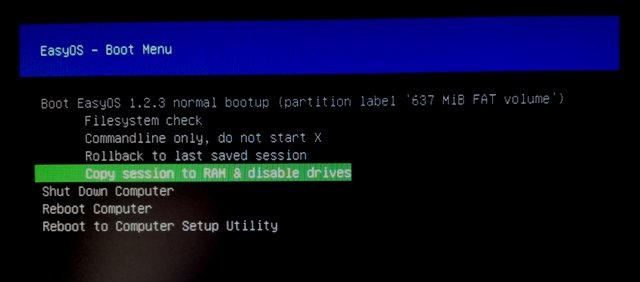
1. Session in RAM is the execution model, not a feature
In EasyOS, Session in RAM is not a convenience mode — it is central to how the system is intended to run.
When enabled:
- The writable layer runs in tmpfs
- File access happens at memory speed
- No disk journaling or background sync occurs during runtime
Persistence is optional and explicit, performed only at shutdown if you choose to save.
This removes the single biggest source of UI latency on Linux systems: runtime disk I/O.
2. No background I/O you didn’t ask for
Most modern distros continuously touch disk due to:
- system services
- background caches
- update checks
- logging infrastructure
- sandbox helpers
EasyOS avoids this by design:
- Minimal always-on services
- No automatic updates
- No background “maintenance”
An idle EasyOS system is genuinely idle.
On HDDs, older SSDs, and low-power CPUs, this makes a huge difference.
3. Containers without container overhead
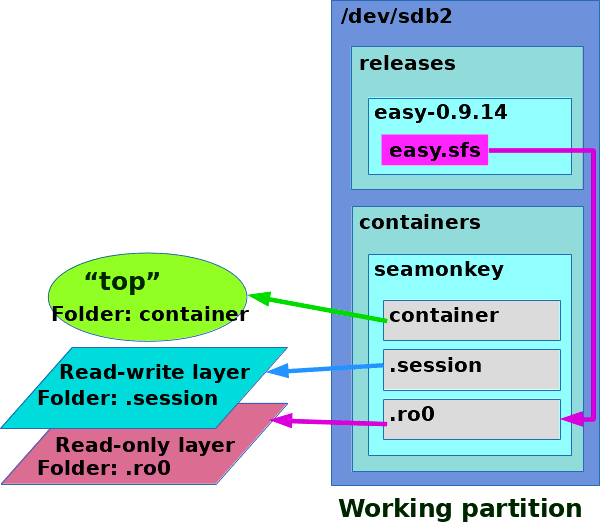
EasyOS uses containers, but not in the heavyweight Docker / Podman sense.
Characteristics:
- Filesystem-level isolation
- No VM abstraction
- Minimal namespace usage
- Near-zero startup overhead
Typical use:
- Browser in a
wwwcontainer - Tools in a
termcontainer - Disposable test environments
You get isolation without the performance penalty commonly associated with containerized systems.
4. JWM + ROX: minimal latency path
EasyOS uses a desktop stack with:
- No compositor
- No animation pipeline
- No GPU dependency for basic operations
Result:
- Instant menu opening
- Immediate window mapping
- Predictable input response
This is not “retro”.
It is efficient event handling.
5. Clear filesystem boundaries
EasyOS enforces strict separation between:
- System state
- Runtime state
- Mounted external filesystems
For example:
/mntis excluded from session merges- External mounts are never implicitly saved
- Saves are fast and deterministic
This prevents long-term performance degradation caused by uncontrolled persistence.
6. Performance does not decay over time
Many systems feel fast when freshly installed, then slow down due to:
- Growing logs
- Accumulated caches
- Service creep
EasyOS avoids this entirely:
- Runtime state disappears on reboot
- Persistence is intentional
- System complexity does not silently grow
Performance is stable, not just fast.
7. Old hardware benefits the most
On modern machines, inefficiencies are hidden by raw power.
On old hardware:
- Latency is obvious
- Disk waits dominate
- Background tasks hurt responsiveness
EasyOS removes those bottlenecks instead of trying to mask them.
That’s why a 10–15-year-old laptop can still feel responsive under EasyOS.
Summary
EasyOS feels faster because it:
- Runs from RAM
- Eliminates background disk activity
- Uses low-overhead containers
- Avoids modern desktop latency traps
- Keeps filesystem state clean and explicit
It is not optimized.
It is unburdened.
Why EasyOS feels fast
- Session runs in RAM (tmpfs)
- No background disk activity
- Very few always-running services
- Containers are lightweight (filesystem-based)
- JWM/ROX has minimal overhead
- Persistence is optional and explicit
- Runtime state does not accumulate
Result:
- Immediate response
- No long-term slowdown
- Works well on old hardware
Speed comes from architecture, not tuning.
